 01. Colors02. Typography03. Spacing Units04. Containers05. Icons06. UI Elements07. UI Components08. Template Pages09. Data Viz Guidelines10. Useful Links01. Colors02. Typography03. Spacing Units04. Containers05. Icons06. UI Elements07. UI Components08. Template Pages09. Data Viz Guidelines10. Useful Links
Tracker design system is a collection of guidelines, reusable user interface elements, and patterns (templates) that define the look, feel, and functionality of the website. It ensures consistency, improves efficiency in design and development, and provides a single source of truth documentation for all design-related decisions.
It’s the key to designing and developing systematically!
The Tracker design system consists of the following components:
• Style guidelines
• Reusable UI elements library
• Reusable components library
• Template pages
The Tracker website uses two sets of colors: Primary Colors and Utility Colors.
The Primary Colors represent the Tracker brand. At the core is OPMI Orange, taken directly from the OPMI logo. This color conveys a lively, forward-looking character and reinforces the OPMI brand identity.
To provide contrast across the website’s interface, the palette also includes darker and lighter variants of OPMI Orange generated with the Material Palette tool. Within this system, the original OPMI Orange corresponds to OPMI Orange 400.
The Utility Colors serve functional design needs. They include a neutral palette and status colors. The neutral palette is built from varying opacities of pure black, producing consistent shades of gray that maintain visual cohesion. Each shade is named with a number that indicates its opacity level.
Status colors, such as those used for inline links, provide clarity and visual feedback to guide user interactions.
OPMI Orange 1000
#d16134
This darkest orange meets WCAG AA contrast standards for large text (24px and above) on white or OPMI Orange 10 backgrounds. Use it only for large headings.
OPMI Orange 900
#d16134
OPMI Orange 700
#e48440
OPMI Orange 400
#f4a954
Use this color for primary buttons. It meets WCAG AA and AAA contrast standards against the Black 87% foreground color.
OPMI Orange 100
#fbe0bd
Use this color for borders and dividers in the website’s UI.
It remains subtle while still clearly visible.
OPMI Orange 50
#fdf3e5
OPMI Orange 10
#fff9f3
Use this ultra-light orange for the site’s background.
Closer to white, it creates a soft, subtle backdrop.
Black 87%
#212121
Use this ‘black’ for primary text on the site.
Tracker avoids pure black to reduce eye strain (too much contrast).
Black 65%
#595959
Use this color for secondary text, such as captions, and for borders on metric cards.
Black 38%
#9e9e9e
Use this color for less important text, such as secondary link text.
It is applied to links that expand metric cards.
Black 12%
#eoeoeo
Black 5%
#f2f2f2
White
#ffffff
Use pure white for metric card backgrounds only.
It creates high contrast against data points in Black 87%.
Link Blue
#005fcc
Use this color for inline links.
Division Blue
#5fa8d3
Use this color for the Division tag on metric cards.
Goal Area Blue
#1a659e
Use this color for Goal Area tag on metric cards.
Poppins is the typeface used throughout the website. This modern sans-serif font is well received within MassDOT.
The typography system follows a modular scale. The base font size is 16px, used for body text. All other text levels are calculated using a 1.25 multiplier, known as the “Major Third” scale. This scale creates medium contrast between text levels, providing hierarchy without being too dramatic. Spacing is optimized for readability and a comfortable reading experience.
Lorem ipsum dolor sit amet, consectetur adipiscing elit. Suspendisse varius enim in eros elementum tristique. Duis cursus, mi quis viverra ornare, eros dolor interdum nulla, ut commodo diam libero vitae erat. Aenean faucibus nibh et justo cursus id rutrum lorem imperdiet. Nunc ut sem vitae risus tristique posuere.
Lorem ipsum dolor sit amet, consectetur adipiscing elit. Suspendisse varius enim in eros elementum tristique. Duis cursus, mi quis viverra ornare, eros dolor interdum nulla, ut commodo diam libero vitae erat. Aenean faucibus nibh et justo cursus id rutrum lorem imperdiet. Nunc ut sem vitae risus tristique posuere.
Class name: Regular-inline-link
Class name: Small-inline-link
Metric cards in the Data Explorer section have their own typography system. They require a unique visual hierarchy to effectively display data-heavy information within their UI space.
123,456,789
FY25
123,456,789
FY24
The quick brown fox jumps over the lazy dog
123,456,789
Lorem ipsum dolor sit amet, consectetur adipiscing elit, sed do eiusmod tempor incididunt ut labore et dolore magna aliqua. Ut enim ad minim veniam, quis nostrud exercitation ullamco laboris nisi ut aliquip ex ea commodo consequat. Duis aute irure dolor in reprehenderit in voluptate velit esse cillum dolore eu fugiat nulla pariatur.
Spacing units (SU) provide a set of standardized measurements for consistent spacing between UI elements. The system starts at 4px and increases by multiples of two, creating a harmonious rhythm across the website.
To use this system, apply the same SU consistently to the margin or padding of similar elements or functional sections. For example, the bottom margins of all major sections should use the same SU.
Primarily, use margin-bottom and margin-right to set spacing, reflecting the website’s top-down and left-to-right layout.
0.5 SU - 4PX / 0.25REM
1 SU - 8PX / 0.5REM
2 SU - 16PX / 1REM
3 SU - 25PX / 1.5REM
4 SU - 32PX / 2REM
5 SU - 64PX / 4REM
6 SU - 80PX / 5REM
7 SU - 96PX / 6REM
8 SU - 128PX / 8REM
In this section, containers refer to the defined spaces that hold website content such as text and images. Containers use paddings and a width range to maintain visual balance and consistent proportions across the page.
We adjust container sizes at different breakpoints to provide the best possible layout for reading content. On larger screens, fixed-width containers ensure an optimal line length for text, keeping it comfortable to read and preventing lines from becoming too wide.
Click this link to view a live demo of the responsive containers on the Tracker website.
Icons play an important role in displaying information on Tracker’s metric cards. This set of icons is designed to communicate trends in metric changes. Their shapes and colors convey specific meanings while maintaining a muted visual appearance to preserve the overall visual hierarchy.

postive up trend

postive down trend

negative up trend

negative down trend

neutral up trend

neutral down trend

neutral no change
This is the collection of smaller building blocks of the Tracker website. These user interface (UI) elements are used repetitively through out the website.
This is the collection of larger building blocks of the Tracker website. A reusable component can often be comprised of established UI elements in the last section.








This is the UI component used for metric cards in Tracker’s Data Explorer.
The styles and layouts are defined in the style selectors applied to the card.
Refer to the Typography section for more details on the metric card’s typography design.
This is a collection of template pages that provide consistent layouts and groups of UI elements serving the same function across the website, with different content populated each time.
Closer Looks Template Page
Link
Scrollytelling Template Page
Link
This guideline applies only to data visualizations created for the Tracker website. It outlines standards for color, typography, and chart sizing. For the 2025 Tracker, all visualizations are built using R’s ggplot package.
Tracker’s data visualizations use a dedicated color palette. Because the website is already visually rich, colors in data visualizations should be used sparingly to help readers focus on the data itself.
Colors in Tracker’s data visualizations primarily serve to distinguish between categories, especially when there are no headers. Most Tracker metrics include up to four categories. Use the following four colors to represent them:
MassDOT Blue
#057dc2
The MassDOT brand color from its logo.
Viz Turquoise
#06b8c2
An adjacent color to the MassDOT Blue, close on the color wheel but distinct enough to differentiate.
Viz Light Green
#99d998
A lighter, less saturated version of the MassDOT green from its logo to create a calmer tone suitable for data visualization.
Viz Dark Green
#005f38
An adjacent color to Viz Light Green, staying within the green family for visual harmony.
When data visualization marks include headers, use only MassDOT Blue in the visualization.
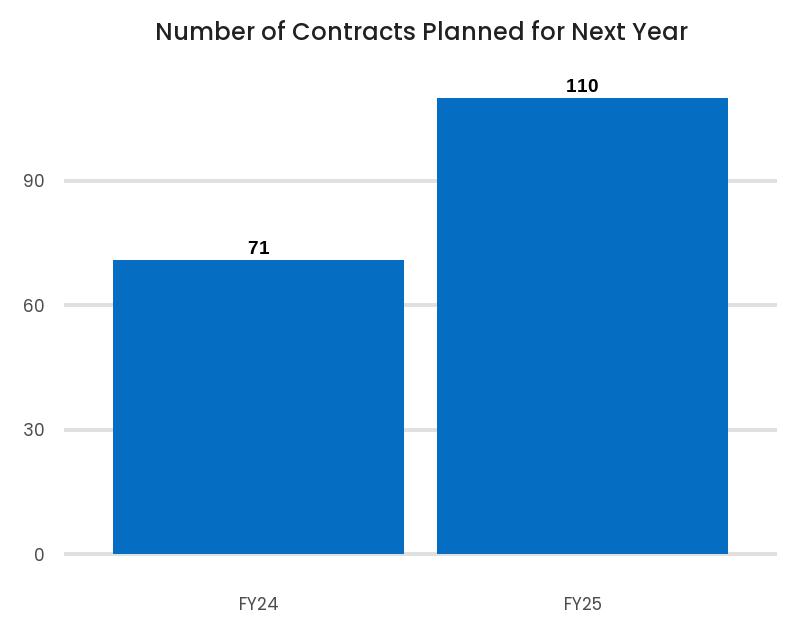
When there are multiple categories without inherent meaning, use the colors in this order:
1, MassDOT Blue
2, Viz Turquoise
3, Viz Dark Green
4, Viz Light Green
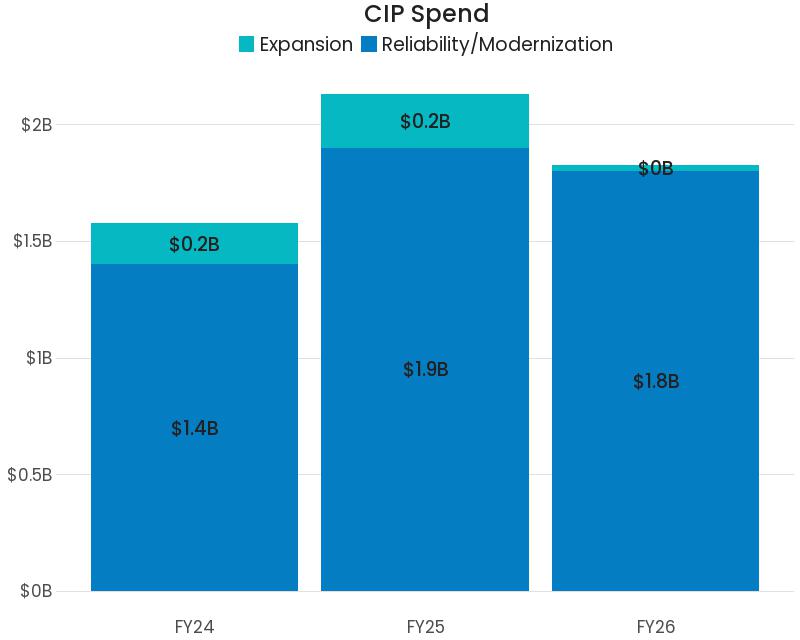
For positive and negative comparisons with two categories, use MassDOT Blue for the negative and Viz Dark Green for the positive.
For four-level positive–negative visualizations(e.g., Poor, Fair, Good, Excellent), use two blues for negative and two greens for positive categories:
Viz Dark Green represents worse than Viz Light Green.
MassDOT Blue represents worse than Viz Turquoise.
For categories beyond these examples, consult the data viz team or use your best judgment. If more than four colors are needed, please reach out to the data viz team for guidance.
For sequential data (e.g., commute time), generate a sequential palette based on MassDOT Blue using this tool below. Adjust the number of colors as needed
For MBTA-related visualizations, use the MBTA system colors whenever possible to maintain brand alignment.
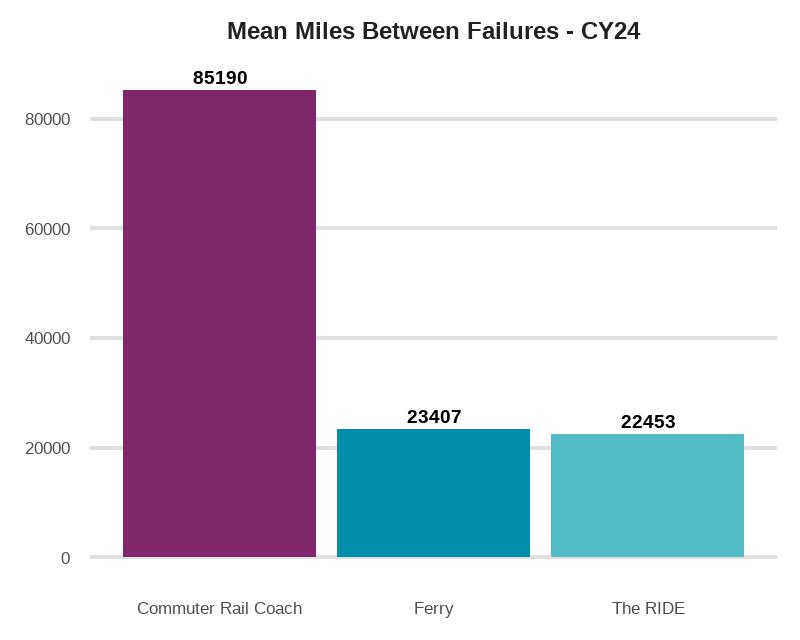
Titles, headers, and data labels should use Black 87% (#212121).
Peripheral elements such as axes, ticks, and axis labels should use Black 12% (#e0e0e0).
Modular Typographic System Tool
https://typescale.com/
Material Design System Color Tool
https://m2.material.io/design/color/the-color-system.html
Attributes CMS Filter Documentation
https://finsweet.com/attributes/cms-filter
Attributes List Tabs Documentation
https://finsweet.com/attributes/list-tabs
Attributes CMS Filter Tutorial
https://www.youtube.com/watch?v=z5mP97WVsCg
Accessible Form Filter Components
https://webflow.com/made-in-webflow/website/Accessible-Form-Filter-Components
How to Style Rich Text Elements in Webflow
https://www.youtube.com/watch?v=94KVMsMFChs&t=116s
Expandable Card Example
https://webflow.com/made-in-webflow/website/contact-us-b910d8?ref=made-in-webflow-search&searchValue=expander
How to Style Individual CMS Items
https://www.youtube.com/watch?app=desktop&v=yOk8e769CwA
Scrollytelling Tutorial
https://www.youtube.com/watch?v=neNPspLnxz8
Color Blindness Simulator
https://www.color-blindness.com/coblis-color-blindness-simulator/
Contrast Check
https://webaim.org/resources/contrastchecker/
Render Custom Code (HTML table) from Webflow CMS
https://wfhow.com/2019/07/06/render-collection-custom-code-webflow/
Tracker Closer Looks Section Set Up Guideline
https://cdn.prod.website-files.com/68137d658dc31e1252381fa1/686c217153d02a4deb6ac7fa_Tracker%20Closer%20Looks%20Section%20Set%20Up.pdf